0 ratings




Item #:
103018094
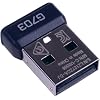
G703 USB Dongle Mouse Receiver Adapter Replacement for Logitech Lightspeed G703 G900 G903 G403 G603 Gaming Wireless Mouse (G703)
Item #:
103018094
MYR 116
Price Details
Excluding Shipping & Custom charges ( Shipping and custom charges will be calculated on checkout )
*All items will import from US
In stock
 Imported from USA store
QTY:
Order now and get it around Wednesday, June 24
Secured transaction
Ubuy works hard to protect your security and privacy. Our advanced payment security system ensures confidentiality by encrypting your information during transmission using AES (Advanced Encryption Standards) and SSL (Secure Socket Layer) protocols. Your payment details are 100% secure as we do not share your payment details with third party sellers.
Our Top Logistics Partners


Easy to install and perfectly compatible with your Logitech G Pro Lightspeed Mouse.

Fast
Shipping

Free
Return*

Secure Packaging

100% Original Products

PCI DSS Compliance

ISO 27001 Certified


Note: Step Down Voltage Transformer required for using electronics products of US store (110-120). Recommended power converters Buy Now.


What Stands Out
Compatible Replacement
Designed specifically for Logitech gaming mice, this dongle ensures seamless connectivity for models like G703, G900, and G903, offering an easy solution to restore lost or damaged receivers.
High Performance
Delivers low-latency wireless connectivity, allowing gamers to experience precision tracking and responsiveness during gameplay, enhancing performance compared to standard USB dongles.
User-Friendly
Plug-and-play design simplifies setup, eliminating technical hurdles. This product offers a hassle-free experience for users looking to quickly get back to gaming without complicated installation.
Product Details
- Compatible Model: For Logitech G703/G900/G403/G603/G903 Lightspeed Wireless Mouse
- Type: Wireless Mouse Receiver
- Interface: USB
| Hardware Interface | USB |
| Compatible Devices | Mouse |
| Item Weight | 0.04 Pounds (20 grams) |
| Color | G703 |
| Brand | TALTAW |
| UPC | 717365148321 |
| Manufacturer | TALTAW |
| Number of Items | 1 |
Who Should Buy?

-
Gamers
Ideal for gamers needing a reliable replacement for lost or damaged receivers to maintain seamless wireless performance.
-
Tech Enthusiasts
Suitable for tech-savvy users who frequently switch between devices and require effective connectivity solutions.
-
Frequent Travelers
Perfect for users on the go, offering portability and easy use with Logitech wireless mice in different environments.

-
Casual Users
Not ideal for occasional users who may not need a replacement adapter for their Logitech mouse.
-
Budget Shoppers
Users looking for economical solutions may find this adapter too expensive compared to basic alternatives.
-
Non-Logitech Mice
Users with non-Logitech wireless mice will not benefit from this adapter, as it is manufacturer-specific.
Product Description
Have any Query? Chat with us
Customer Questions & Answers
-
Question:
What is the purpose of the USB dongle for the Logitech G Pro Lightspeed Wireless Gaming Mouse?
Answer: The USB dongle serves as the receiver for the Logitech G Pro Lightspeed Wireless Gaming Mouse, allowing it to communicate wirelessly with your computer. This tiny adapter plugs into your device's USB port and establishes a fast, reliable connection that minimizes lagging. It's designed to support high-performance gaming, ensuring seamless connectivity even in intense gaming sessions. -
Question:
Is the USB dongle compatible with other Logitech devices?
Answer: The USB dongle for the Logitech G Pro Lightspeed Wireless Gaming Mouse is primarily designed for that specific model and may not be compatible with all Logitech devices. However, some Logitech peripherals use the same Unifying Receiver technology, allowing multiple devices to connect through one dongle. It’s best to check compatibility on Logitech’s official website or product documentation for other devices. -
Question:
How do I install the USB dongle for my Logitech G Pro Lightspeed Mouse?
Answer: Installing the USB dongle is straightforward: simply plug it into an available USB port on your computer. The system should automatically recognize it, enabling the mouse for use right away. If needed, you can download Logitech's G Hub software for additional settings and customization, enhancing your gaming experience by adjusting DPI settings and button functions. -
Question:
Can I use my Logitech G Pro Lightspeed Mouse without the USB dongle?
Answer: No, the Logitech G Pro Lightspeed Mouse relies on the USB dongle for wireless connectivity. Without it, the mouse cannot communicate with your computer. If the dongle is lost or damaged, you will need a replacement to restore functionality. Always ensure you keep the dongle in a safe place when not in use to avoid such issues. -
Question:
What should I do if my USB dongle isn't recognized by my computer?
Answer: If your USB dongle isn't recognized, start by trying it in a different USB port. If the issue persists, unplug and reconnect the dongle, and restart your computer. You may also want to check device settings to ensure no conflicts exist. If these steps don’t resolve the issue, consider re-pairing the dongle with the mouse or contacting Logitech support for further assistance. -
Question:
Is there a range limit for the Logitech G Pro Lightspeed Wireless Mouse when using the dongle?
Answer: Yes, the range for effective performance with the USB dongle is typically around 10 meters (approximately 33 feet) in an open environment. Walls and electronic interference can diminish the effective range. To achieve optimized connectivity, use the mouse within this range without obstructions, especially during competitive gaming where responsiveness is critical. -
Question:
How can I ensure a stable connection with the USB dongle for my Logitech mouse?
Answer: To ensure a stable connection, keep the dongle within the recommended range and away from potential sources of interference, like other wireless devices, microwaves, or metal objects. Using a USB extension cable can help position the dongle closer to your mouse for optimal signal strength, especially in complex gaming setups. Frequent disconnections can impact gameplay, so minimizing interference is crucial. -
Question:
What happens if I lose my USB dongle?
Answer: If you lose your USB dongle, you will need a replacement to use your Logitech G Pro Lightspeed Wireless Gaming Mouse wirelessly. Logitech may offer a replacement for purchase through their support services or website. Alternatively, consider investing in a new set that includes the dongle if you need immediate functionality. Always handle your dongle carefully to avoid losing it. -
Question:
Where can I buy a USB Dongle Mouse Receiver Adapter for Logitech G Pro Lightspeed Wireless Gaming Mouse?
Answer: You can purchase a USB Dongle Mouse Receiver Adapter for Logitech G Pro Lightspeed Wireless Gaming Mouse on Ubuy. Ubuy offers a variety of options and makes it convenient to find the exact product you need with ease. Be sure to check for availability and enjoy a seamless shopping experience. -
Question:
Are there any performance differences between wired and wireless modes for this mouse?
Answer: While both wired and wireless modes provide excellent performance, wired mode offers potentially lower latency and a more stable connection, which can be crucial in competitive gaming. The Logitech G Pro Lightspeed mouse, however, is engineered for minimal lag in wireless mode, making it suitable for high-paced gaming. Your choice depends on your personal preference for convenience versus the ultra-responsive performance of a wired connection.
TALTAW Remote Controls Editorial Review


No editorial reviews found
Customer Reviews & Ratings
64 customers ratings
-
5 Star
70%
-
4 Star
14%
-
3 Star
0%
-
2 Star
6%
-
1 Star
10%
Review this product
Share your thoughts with other customers
Pros
- High precision for gaming
- Stable wireless connection
- Seamless compatibility with Logitech
- Compact and portable design
- Plug-and-play functionality
Product Price History
Important information
- Limitations : For products shipped internationally, please note that any manufacturer warranty may not be valid; manufacturer service options may not be available; product manuals, instructions, and safety warnings may not be in destination country languages; the products (and accompanying materials) may not be designed in accordance with destination country standards, specifications, and labeling requirements; and the products may not conform to destination country voltage and other electrical standards (requiring use of an adapter or converter if appropriate). The recipient is responsible for assuring that the product can be lawfully imported to the destination country. When ordering from Ubuy or its affiliates, the recipient is the importer of record and must comply with all laws and regulations of the destination country.
- Not all the products listed on Ubuy are for sale, as Ubuy is a global search engine. Products are subject to export/trade regulations.
MYR 116
Order now and get it around Wednesday, June 24
This item is not restrict in my country.(Please click on above link if this item is not restrict in your country, So our team will review and allow.)
QTY:
Secured transaction
Ubuy works hard to protect your security and privacy. Our advanced payment security system ensures confidentiality by encrypting your information during transmission using AES (Advanced Encryption Standards) and SSL (Secure Socket Layer) protocols. Your payment details are 100% secure as we do not share your payment details with third party sellers.
Our Top Logistics Partners
Fastest cross-border delivery
Features & Benefits
- Compatible with Logitech G Pro Lightspeed Mouse.
- Wireless adapter for seamless connectivity.
- Quick and easy installation process.
- Reliable replacement for lost or broken dongles.
- Enhances your gaming experience with efficient performance.
- Must-have accessory for Logitech G Pro users.