- Halaman Utama /
- Mobile Phone Accessories /
- Aksesori /
- Stylus Pens /
- Microsoft Surface Pen for Surface Pro 4 (Silver)
0 ratings

Item #:
4983812
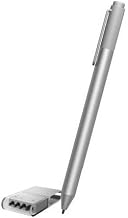
Microsoft Surface Pen for Surface Pro 4 (Silver)
Item #:
4983812
MYR 343
Price Details
Excluding Shipping & Custom charges ( Shipping and custom charges will be calculated on checkout )
*All items will import from AS
0 ratings
Tuliskan ulasan
Dalam stok
 Diimport dari kedai USA
QTY:
Pesan sekarang dan dapatkannya lebih kurang pada Sunday, Ogos 09
Secured transaction
Ubuy works hard to protect your security and privacy. Our advanced payment security system ensures confidentiality by encrypting your information during transmission using AES (Advanced Encryption Standards) and SSL (Secure Socket Layer) protocols. Your payment details are 100% secure as we do not share your payment details with third party sellers.
Our Top Logistics Partners


Fast
Shipping

Free
Return*

Secure Packaging

100% Original Products

PCI DSS Compliance

ISO 27001 Certified


Note: Step Down Voltage Transformer required for using electronics products of AS store (110-120). Recommended power converters Beli Sekarang.


What Stands Out
Precision Input
The Surface Pen offers pinpoint accuracy for drawing and note-taking, enhancing productivity and creativity with minimal lag, making it ideal for artists and professionals alike.
Tilt Support
With tilt support, users can create shading and intricate details, allowing for a natural drawing experience that mimics traditional tools, perfect for illustrators seeking versatility.
Hayat bateri yang panjang
Equipped with a long-lasting battery, the Surface Pen ensures uninterrupted usage, providing convenience for users requiring dependable performance throughout the day without frequent recharging.
Maklumat produk
| Bilangan Bateri | 2 AAA batteries required. |
| Peranti yang serasi | Tablet |
| Penerangan Bateri | Alkali |
| Minimum Required Operating System Version | Windows 10 |
| Compatible Tablet Computer Models | Microsoft Surface Pro 3, Microsoft Surface Pro 4 |
| Berat item | 20 Grams |
| Dimensi Item | 5.67 x 0.37 x 0.4 inches (14.4 x 0.9 x 1 cm) |
| Warna | Perak |
| Bahan Penutup | Perak |
| Jenama | Microsoft |
| Nombor model | FBA_3ZY-00010 |
| Adakah Bateri Termasuk | Tidak |
| Adakah Bateri Diperlukan | Tidak |
| UPC | 889842006124 |
| Nombor Pengenalan Perdagangan Global | 00889842006124 |
| Kiraan Unit | 1.0 Kira |
| Pengeluar | Microsoft |
| Nombor Bahagian Mfr | FBA_3ZY-00010 |
| Bahan | Perak |
| Item dimensions L x W x H | 5.67 x 0.37 x 0.4 inches (14.4 x 0.9 x 1 cm) |
| Bateri Diperlukan? | Tidak |
Who Should Buy?

-
Artis Digital
Ideal for digital artists who require precision and pressure sensitivity for detailed illustrations and creative work.
-
Note Takers
Perfect for students and professionals who prefer handwritten notes on their Surface Pro, enhancing organization and retention.
-
Design Professionals
Useful for designers needing to sketch, annotate, and make detailed adjustments on graphic designs directly on the tablet.

-
Pengguna Santai
Not suitable for casual users who primarily browse, as the pen's features might be unnecessary for basic tasks.
PENERANGAN PRODUK
Microsoft Surface Pen for Surface Pro 4 (Silver)
About This Item
Introducing the Microsoft Surface Pen for Surface Pro 4 Silver – the ultimate tool for unleashing your creativity and enhancing your productivity. Designed specifically for the Surface Pro 4, this Bluetooth-enabled pen elevates your digital writing and drawing experience to a whole new level. With its sleek silver finish, the Microsoft Surface Pen adds a touch of style to your Surface Pro 4. Whether you’re a student, an artist, or a business professional, this pen is the perfect companion for all your tasks and activities. Featuring precise pressure sensitivity, the Surface Pen allows you to draw, sketch, and take notes with exceptional accuracy and control.
Its eraser button also doubles as a right-click button, providing you with a seamless navigation experience. The Surface Pen is packed with features that truly make it stand out. It boasts an impressive battery life, lasting for hours on end, so you can use it throughout the day without worrying about running out of power. It is also compatible with the Surface Pro 4's screen size and storage options, allowing you to fully customize your device to suit your needs. Not only does the Microsoft Surface Pen enhance your creative endeavors, but it also improves your overall productivity.
Use it to navigate through your favorite apps, edit documents, and annotate presentations effortlessly. With the Surface Pen, you'll find yourself working faster and more efficiently than ever before. Don't miss out on the opportunity to elevate your Surface Pro 4 experience. Get the Microsoft Surface Pen for Surface Pro 4 Silver today and take your productivity to new heights.
Ada sebarang Pertanyaan? Berbual dengan kami
Soalan & Jawapan Pelanggan
-
soalan:
What are the main features of the Microsoft Surface Pen for Surface Pro 4?
jawab: The Microsoft Surface Pen for Surface Pro 4 features 4,096 levels of pressure sensitivity, allowing for precise drawings and notes. Its tilt support lets users create shadows and shading effects, enhancing the artistic experience. The pen includes a customizable button that can be programmed for shortcuts, making it adaptable to your workflow, whether for artistic endeavors or productivity tasks. -
soalan:
Is the Microsoft Surface Pen compatible with other Surface devices?
jawab: Yes, the Microsoft Surface Pen is compatible with a variety of Surface devices, including the Surface Pro series and Surface Book models. However, functionalities may vary depending on the device. This compatibility allows users to switch between devices seamlessly while maintaining a consistent writing experience, whether for note-taking, drawing, or editing documents. -
soalan:
How does the Microsoft Surface Pen connect to the Surface Pro 4?
jawab: The Microsoft Surface Pen connects to the Surface Pro 4 via Bluetooth, enabling it to interact wirelessly and provide pressure sensitivity. Setting it up is simple; users just need to pair it through the device's Bluetooth settings. This wireless connection ensures a clutter-free writing experience, making it perfect for both artists and professionals who require mobility. -
soalan:
Can I replace the tip of the Microsoft Surface Pen?
jawab: Yes, the tip of the Microsoft Surface Pen can be replaced. Replacement tips come in various hardness options, allowing users to customize their writing experience according to preference. By changing the tips, you can achieve different textures and resistance, which is particularly beneficial for artists who require specific feedback based on their drawing techniques. -
soalan:
What is the battery life of the Microsoft Surface Pen?
jawab: The Microsoft Surface Pen is designed with long-lasting battery life, typically lasting around 12 months with regular use before needing a battery replacement. It uses a standard AAAA battery, which is easily replaceable. This extended battery life means you can focus on your work without frequent interruptions, making it ideal for both students and professionals alike. -
soalan:
Does the Microsoft Surface Pen require any software installation?
jawab: The Microsoft Surface Pen does not require any additional software installation to function with the Surface Pro 4. It works natively with Windows applications, allowing for instant use. This ease of use facilitates a smooth experience for both creative tasks, like sketching, and productivity tasks, such as note-taking and editing documents, without any setup hassles. -
soalan:
What types of tasks can I accomplish with the Microsoft Surface Pen?
jawab: The Microsoft Surface Pen is versatile, making it ideal for various tasks including digital art, note-taking, document annotation, and more. Artists can utilize its pressure sensitivity for detailed illustrations, while students and professionals can employ it for jotting down ideas or editing PDFs. This versatility enhances productivity regardless of your specific needs, allowing for creativity and organization. -
soalan:
How does the Surface Pen enhance the overall Surface Pro 4 experience?
jawab: The Surface Pen complements the Surface Pro 4 by bringing a natural writing and drawing feel to the device. It enhances functionality through features like palm rejection when writing, allowing users to rest their hands comfortably without interfering with the screen. This results in a more intuitive and engaging experience, making it easier for users to interact with their digital content. -
soalan:
What color options are available for the Microsoft Surface Pen?
jawab: The Microsoft Surface Pen for Surface Pro 4 is available in various color options, including Silver, Black, and Cobalt Blue. This range allows users to choose a pen that matches their style or the color of their Surface devices. The option to personalize the pen's appearance helps add a touch of personality to your tech setup, making it a reflection of your unique taste. -
soalan:
Where can I buy Microsoft Surface Pen for Surface Pro 4 (Silver) in Malaysia?
jawab: You can purchase the Microsoft Surface Pen for Surface Pro 4 (Silver) from Ubuy in Malaysia. Ubuy offers a wide selection of authentic electronic accessories, including the Surface Pen, ensuring you receive a quality product suitable for your Surface Pro 4. Shopping at Ubuy provides a convenient platform for your tech needs with detailed product information.
Microsoft Stylus Pens Editorial Review
Tiada ulasan editorial ditemui
Customer Reviews & Ratings
1 rating pelanggan
-
5 bintang
0%
-
4 bintang
100%
-
3 bintang
0%
-
2 bintang
0%
-
1 bintang
0%
Ulas Produk Ini
Kongsikan pandangan anda dengan pelanggan lain
Platform Trust & Buyer Confidence

MT
Mohd
Verified buyer
“The product received very good packaging & safe…Thank You”
16 June 2026 · via Trustpilot
SJ
Shawati
Verified buyer
“Accurate delivery timing given”
16 June 2026 · via Trustpilot
YB
Youcef
Verified buyer
“Not madly expensive like I thought, and much quicker than promised.”
15 June 2026 · via Trustpilot
LM
Leila
Verified buyer
“Never dealt with Ubuy before, but everything worked out great. Seamless cross border purchasing and shipping. Thanks!”
6/7/2026 · via Trustpilot
KA
Kwame
Verified buyer
“The process was smooth, with clear communication and timelines. This was my 1st purchase and I am really impressed. I will definitely be coming back.”
12 June 2026 · via Trustpilot
Pendaftaran Keluar Selamat
Global Delivery
Easy Returns
Genuine Products
Product Price History
Maklumat penting
- Pengehadan: Untuk produk penghantaran antarabangsa, harap maklum bahawa sebarang jaminan pengeluar mungkin tidak sah; pilihan perkhidmatan pengeluar mungkin tidak tersedia; manual produk, arahan, dan amaran keselamatan mungkin tidak dalam bahasa negara destinasi; produk-produk (dan bahan-bahan berkaitannya) mungkin tidak direka selaras dengan standard negara destinasi, spesifikasi, dan syarat pelabelan; dan produk-produk itu mungkin tidak mematuhi kepada voltan negara destinasi dan lain-lain standard elektrik (memerlukan penggunaan adaptor atau penukar aliran jika perlu). Penerima adalah bertanggungjawab untuk memastikan bahawa produk itu boleh diimport selaras dengan undang-undang negara destinasi. Apabila memesan dari Ubuy atau pihak afiliasinya, si penerima adalah merupakan pengimport dalam rekod dan mesti mematuhi kepada semua undang-undang dan peraturan negara destinasi.
- Bukan semua produk yang tersenarai di Ubuy adalah untuk dijual, kerana Ubuy adalah enjin carian global. Produk-produk adalah tertakluk kepada peraturan eksport/perdagangan.
MYR 343
Pesan sekarang dan dapatkannya lebih kurang pada Sunday, Ogos 09
This item is not restrict in my country.(Please click on above link if this item is not restrict in your country, So our team will review and allow.)
QTY:
Secured transaction
PCI DSS compliant and ISO 27001:2022 certified, with encrypted payments and full buyer protection on every order.
Our Top Logistics Partners
Fastest cross-border delivery
Ubuy Assurance
Experience worry-free shopping with 100% original products, PCI DSS-compliant payment security, ISO 27001-certified data protection, the fastest cross-border delivery, free returns *, and secure packaging on every order.