0 ratings


Item #:
219460246
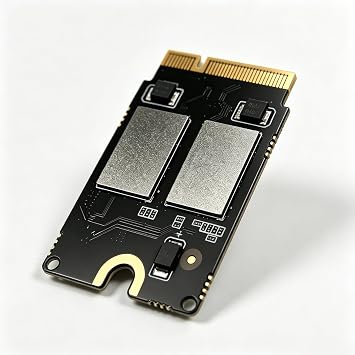
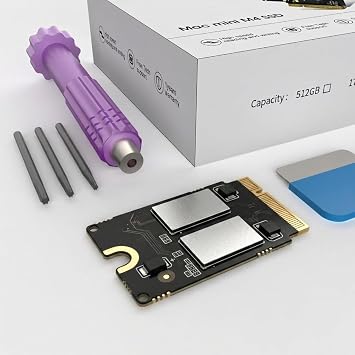
Mac mini M4 2TB SSD Hard Disk Upgrade DIY | SSD Upgrade for Mac mini M4, 3300MB/s High Speed, Easy Installation, Reliable Storage
Item #:
219460246
MYR 2547
Price Details
Excluding Shipping & Custom charges ( Shipping and custom charges will be calculated on checkout )
*All items will import from AS
0 ratings
Tuliskan ulasan
Dalam stok
 Diimport dari kedai USA
QTY:
Pesan sekarang dan dapatkannya lebih kurang pada Sabtu, September 19
Secured transaction
Ubuy works hard to protect your security and privacy. Our advanced payment security system ensures confidentiality by encrypting your information during transmission using AES (Advanced Encryption Standards) and SSL (Secure Socket Layer) protocols. Your payment details are 100% secure as we do not share your payment details with third party sellers.
Our Top Logistics Partners


Engineered exclusively for Mac Mini M4, this SSD quadruples your storage capacity to effortlessly house large media libraries, professional-grade applications.

Fast
Shipping

Free
Return*

Secure Packaging

100% Original Products

PCI DSS Compliance

ISO 27001 Certified






Note: Step Down Voltage Transformer required for using electronics products of AS store (110-120). Recommended power converters Beli Sekarang.


What Stands Out
Easy Installation
This DIY kit simplifies the hard disk upgrade process, allowing users to effortlessly enhance their Mac mini's storage without professional assistance, saving both time and money.
1TB Storage
Offering a spacious 1TB SSD, this upgrade significantly boosts file storage capacity, enabling users to store large applications, media, and files without worrying about running out of space.
High Performance
The M4 SSD enhances device performance, reducing load times and increasing data transfer speeds. Users can enjoy a more responsive system for demanding applications and multitasking.
Maklumat produk
| Hardware Interface | eSATA |
| Hardware Platform | x86_64 |
| Memory Storage Capacity | 2 TB |
| Compatible Devices | Mac mini M4 |
| Supported Devices Quantity | 4 |
| Data Transfer Rate | 3300 megabits_per_second |
| Connectivity Technology | SATA |
| Color | M4-2TB |
| Enclosure Material | Aluminum |
| Item Weight | 0.02 kg |
| Brand | sbaceflay |
| Unit Count | 1 Count |
| Number of Items | 1 |
| Manufacturer | sbaceflay |
| UPC | 726899873371 |
| Built-In Media | Installation Guide |
| Model Number | M-2 |
| Mfr Part Number | M4-2TB |
| Material | Aluminum |
Who Should Buy?

-
Tech Enthusiasts
Users who enjoy upgrading their hardware will appreciate the flexibility of a DIY SSD installation.
-
Content Creators
Photographers and video editors will benefit from increased speed and capacity for storing large files.
-
Budget-Conscious Users
Those looking to enhance their Mac mini's performance without purchasing a new model will find this upgrade viable.

-
Non-Technical Users
Individuals unfamiliar with hardware upgrades may struggle with the installation process and require professional help.
PENERANGAN PRODUK
Mac mini M4 2TB SSD Hard Disk Upgrade DIY | SSD Upgrade for Mac mini M4, 3300MB/s High Speed, Easy Installation, Reliable Storage
Ada sebarang Pertanyaan? Berbual dengan kami
Related Searches
Soalan & Jawapan Pelanggan
-
soalan:
Bagaimana untuk Membeli-belah Mac mini M4 2TB SSD Hard Disk Upgrade DIY | SSD Dalam Talian Dari Ubuy?
jawab: Sangat mudah untuk membeli-belah Mac mini M4 2TB SSD Hard Disk Upgrade DIY | SSD dalam talian daripada Ubuy.. Anda hanya perlu mencari produk, pilih kaedah penghantaran anda semasa mendaftar keluar dan hantar ke lokasi anda. -
soalan:
Adakah Mac mini M4 2TB SSD Hard Disk Upgrade DIY | SSD Tersedia untuk Beli-belah Dalam Talian dalam Malaysia?
jawab: Ya, di Ubuy Malaysia produk ini tersedia untuk anda membeli-belah pada harga yang berpatutan.. Mac mini M4 2TB SSD Hard Disk Upgrade DIY | SSD tidak tersedia secara tempatan tetapi anda boleh mempercayai kami dengan perkhidmatan penghantaran ekspres kami. -
soalan:
Berapa lama masa yang diperlukan untuk mendapatkan produk selepas membuat pesanan?
jawab: Masa penghantaran produk pesanan anda berbeza mengikut apa yang anda pesan dan kaedah penghantaran yang anda pilih.. Anggaran masa penghantaran dinyatakan semasa proses daftar keluar, jadi berhati-hati semasa membeli-belah.
sbaceflay Internal Components M-2 Editorial Review
Mac mini M4 2TB SSD Hard Disk Upgrade DIY | SSD Upgrade for Mac mini M4, 3300MB/s High Speed, Easy Installation, Reliable Storage offers an impressive upgrade for Mac mini M4 users. With a data transfer rate of 3300 MB/s and a robust 2 TB storage capacity, it promises enhanced performance for demanding tasks, such as video editing. Many users have found the installation straightforward, especially when following guides from iFixit and various YouTube channels. Although some encountered initial issues with installation or defective units, overall satisfaction seems high, particularly regarding speed boosts which have been noted even after several months of use. Keep in mind the importance of careful installation for the best results.
Customer Reviews & Ratings
1 rating pelanggan
-
5 bintang
100%
-
4 bintang
0%
-
3 bintang
0%
-
2 bintang
0%
-
1 bintang
0%
Ulas Produk Ini
Kongsikan pandangan anda dengan pelanggan lain
Kebaikan
- Upgrades storage to 2TB easily
- High data transfer rate at 3300MB/s
- Installation guides available online
- Compatible with Mac mini M4
- Aluminum enclosure for durability
Keburukan
- Initial installation may require some patience
Related Categories
Related Brands
Top selling Mac mini SSD upgrade in Malaysia





Last Updated on August 20, 2026
Product Price History
Maklumat penting
- Pengehadan: Untuk produk penghantaran antarabangsa, harap maklum bahawa sebarang jaminan pengeluar mungkin tidak sah; pilihan perkhidmatan pengeluar mungkin tidak tersedia; manual produk, arahan, dan amaran keselamatan mungkin tidak dalam bahasa negara destinasi; produk-produk (dan bahan-bahan berkaitannya) mungkin tidak direka selaras dengan standard negara destinasi, spesifikasi, dan syarat pelabelan; dan produk-produk itu mungkin tidak mematuhi kepada voltan negara destinasi dan lain-lain standard elektrik (memerlukan penggunaan adaptor atau penukar aliran jika perlu). Penerima adalah bertanggungjawab untuk memastikan bahawa produk itu boleh diimport selaras dengan undang-undang negara destinasi. Apabila memesan dari Ubuy atau pihak afiliasinya, si penerima adalah merupakan pengimport dalam rekod dan mesti mematuhi kepada semua undang-undang dan peraturan negara destinasi.
- Bukan semua produk yang tersenarai di Ubuy adalah untuk dijual, kerana Ubuy adalah enjin carian global. Produk-produk adalah tertakluk kepada peraturan eksport/perdagangan.
MYR 2547
Pesan sekarang dan dapatkannya lebih kurang pada Sabtu, September 19
This item is not restrict in my country.(Please click on above link if this item is not restrict in your country, So our team will review and allow.)
QTY:
Secured transaction
PCI DSS compliant and ISO 27001:2022 certified, with encrypted payments and full buyer protection on every order.
Our Top Logistics Partners
Fastest cross-border delivery
Ciri & Faedah
- Quadruples storage capacity for Mac Mini M4.
- Ideal for large media libraries and professional applications.
- Read/write speeds of up to 3300 MB/s for lag-free multitasking.
- Designed for perfect compatibility with original equipment.
- Plug-and-play operation with no compatibility issues.
- Rigorously tested for 30 days for proven reliability.
Ubuy Assurance
Experience worry-free shopping with 100% original products, PCI DSS-compliant payment security, ISO 27001-certified data protection, the fastest cross-border delivery, free returns *, and secure packaging on every order.